CSGO Signature Sticker Generator - Complete Guide
Key takeaways
- A CS:GO signature sticker generator is a free website tool for designing a custom sticker from a tournament logo, team, text, font and color.
- Stickers made this way can't be used in-game; you can only download them as images, for example for a Steam profile picture.
- The only way to get your own signature sticker into the game is to qualify for a CS:GO Major with your team and have it approved.
- The Dreamhack Signature Generator is the most popular option but works only in a desktop browser, not on mobile.
- The Netlify generator updates its assets for each new Major and offers Normal, Glitter, Holo and Gold styles, while TryHardHusky supports custom backgrounds.
Table of contents
There is a free tool that allows you to design your own signature stickers in CS:GO. It's called a CSGO signature sticker generator. Thanks to this ultimate guide you will know how to make a CSGO sticker with this tool. And we guarantee that your new free sticker won't be worse than CS GO stickers that the best pro CSGO player uses in the tournaments. So, let's explore where and how to craft stickers CS:GO without paying a penny for it.
What is a Signature Sticker Generator in CS:GO?
A CS:GO signature sticker generator is a very simple tool. It lets you design your own custom CS GO stickers and decorate them with the following elements:
- a logo
- custom words
- colors
- and much more.
Anyone can generate unique CSGO signature stickers for free. All you have to do is choose a website that has this tool.
How to Use CS:GO Signature Sticker Generators?
- Select a signature sticker generator from the list below
- Select a CS:GO tournament logo
- Choose your favorite CS:GO team to be displayed
- Position the logo using the sliders
- Add some unique text and choose a font
- Position the text
- Pick your favorite color
After you have the perfect signature sticker, simply hit Download and you will be done. Also note that some CSGO signature sticker generators let you add a custom background, which makes your sticker even more unique.
The Most Popular CSGO Signature Sticker Generator Tools
The type of signature stickers you can create depends on the site you use. For example, some websites offer more features while others offer fewer. In any case, below we mention the most popular options CS:GO Community use.
- Dreamhack Signature Generator
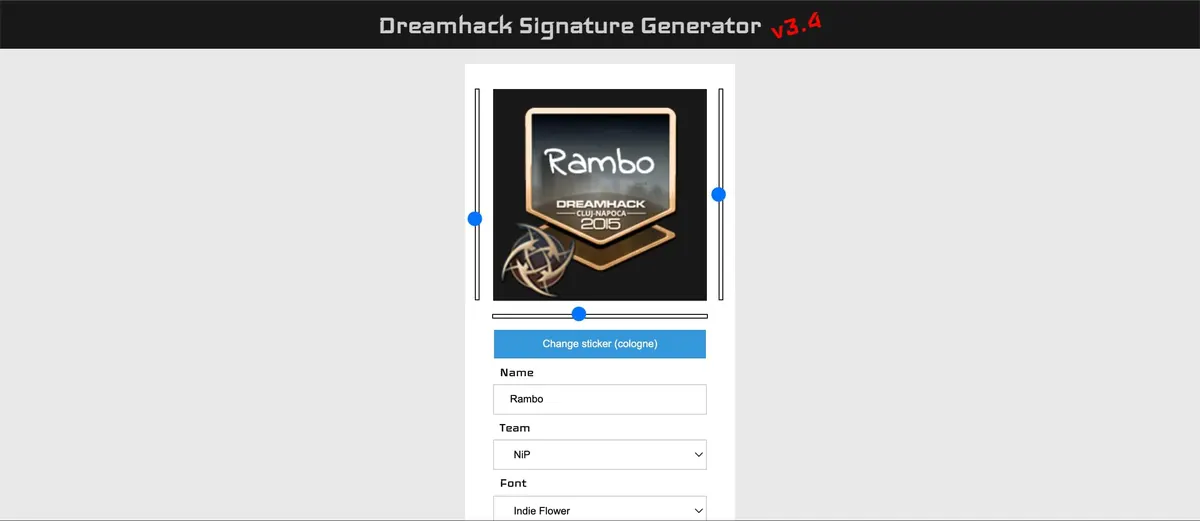
This is currently the most popular free CSGO sticker simulator. It is very simple to use and lets you create a unique sticker in a matter of seconds. Once you're done with the designing process, you can download the image and use it any way you wish.
NOTE: You can only use this tool if you connect to it via a web browser. It does not work if you use it from a mobile device. Ideally, you will want to use Google Chrome!
- Netlify CSGO Signature Sticker Generator
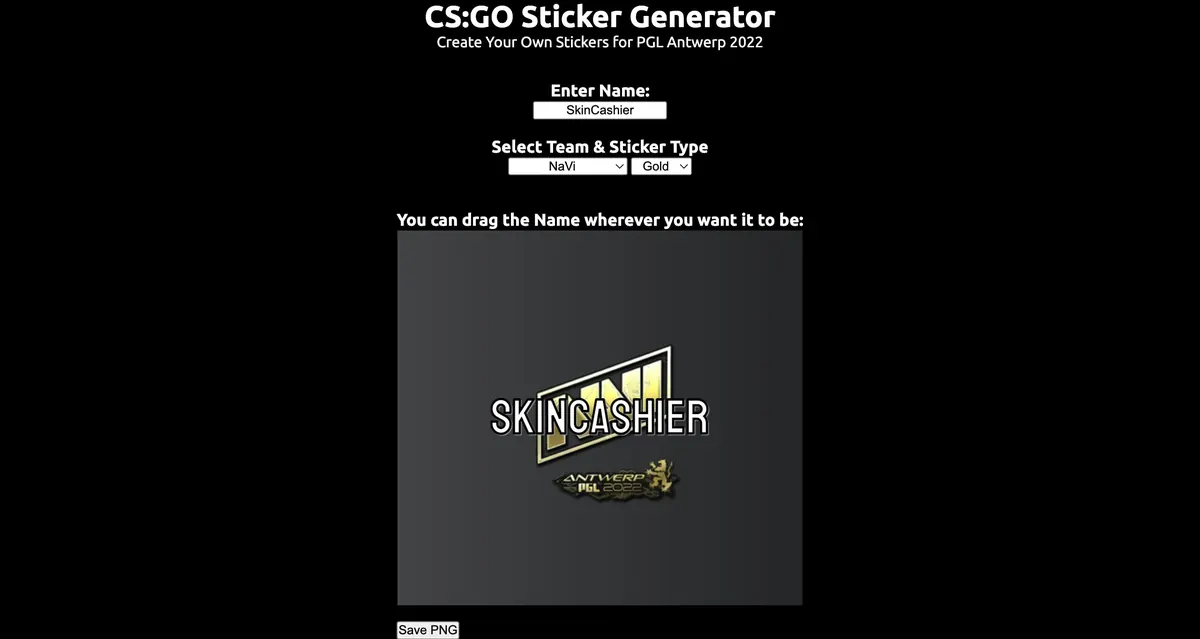
Netlify is a simpler tool that lets you perform fewer operations but includes more frequent updates. For example, it updates the components that you can use to design your sticker every time a new major CSGO tournament starts. It also lets you choose between Normal, Glitter, Holo, or Gold stickers.
This way, you can use Netlify to always be up to date with your CSGO signature stickers.
- TryHardHusky Signature Sticker Generator
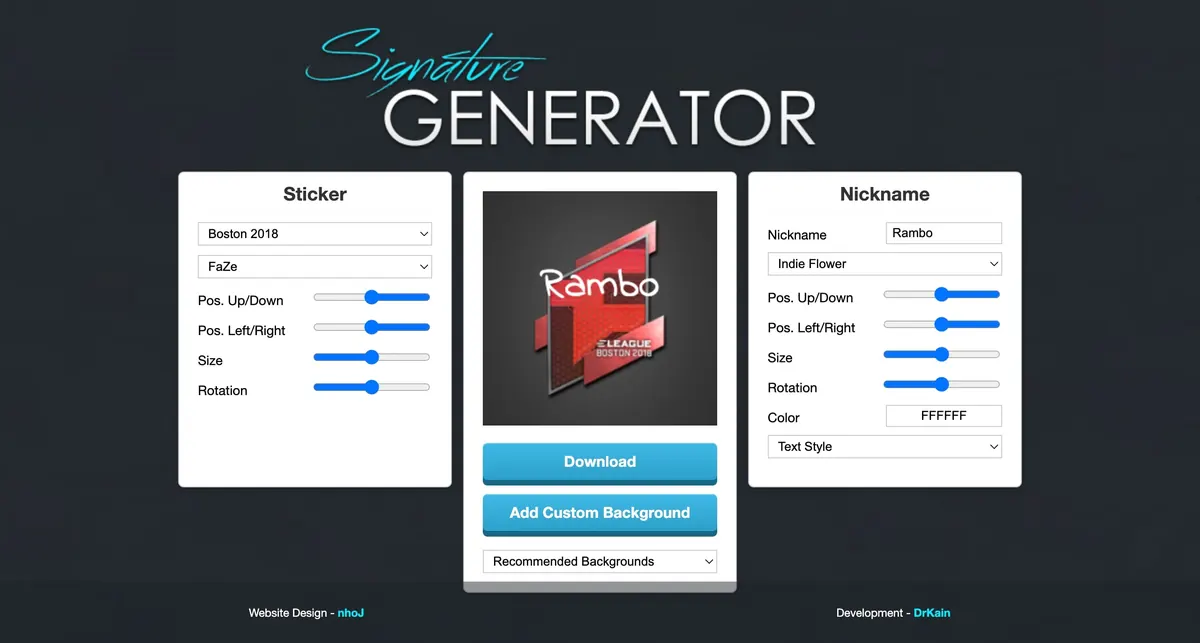
This is one of the most elegant signature sticker generators you can use. Once you open it, you can experience a clean design. Due to it anyone to quickly and easily create their own custom CSGO stickers.
This is also one of the more advanced tools that let you add a fully custom sticker background.
Can You Use Custom CSGO Signature Stickers In-Game?
It's important to know that the stickers you create with a sticker signature generator in CSGO can't be used in-game. You can only download them as images and use them for something like a profile picture on your Steam account or similar. On the other hand, there is one way that you can actually utilize your custom stickers in Counter-Strike: Global Offensive for everyone to use. The way to do this is to actually qualify in a CS:GO major with your own team and get your custom stickers approved. If you can manage that, then you can allow countless other CS GO teams and players to use your unique work.
Final Verdict
Ideally, a better way to create fully custom signature CSGO stickers is to use a more advanced tool like Photoshop. However, it's a painstaking program to use that is not for everyone. Instead, a free sticker signature generator in CSGO can be used by anyone and everyone to instantly create a custom CSGO sticker that looks professional and unique. Hopefully, this guide was able to show you how.
More in Prices & value
Best CS Skins to Invest In: How to Invest?
With difficult economic times people are on a lookout for ways to protect their money. Here are the best CS skins to invest in!
Best CS2 skins
With so many different skins to choose from, it can be difficult to make up your mind. Here are the best CS2 skins in the game today!
How to Use Skin Inspect Server CS2?
It's important to try out your purchase before you buy it, especially if it's expensive. Click here to learn about skin inspect servers!